Guide · strength training
A gym log for iPhone, simple and complete
Logging your sets so you know what to do next time: that's what a gym log is for. Here's what Workomp offers at the gym, and its limits.
Logging a gym session
Start your session, add exercises between sets, and finish whenever you like. For each exercise, you see what you did last time.
- Weight and reps, distance and time, or duration depending on the exercise; in kg or lb.
- A rest timer, started when you check off a set; the screen stays on during the workout.
- On the Lock Screen and Dynamic Island: your rest, and the next set to check off without opening the app (iOS 17 and later).
- Offline: the session is saved without a connection and synced afterwards.
338 exercises, and your own
The catalog covers strength, bodyweight, cardio and mobility, with illustrations. You can create your own exercises.
PRs and progress
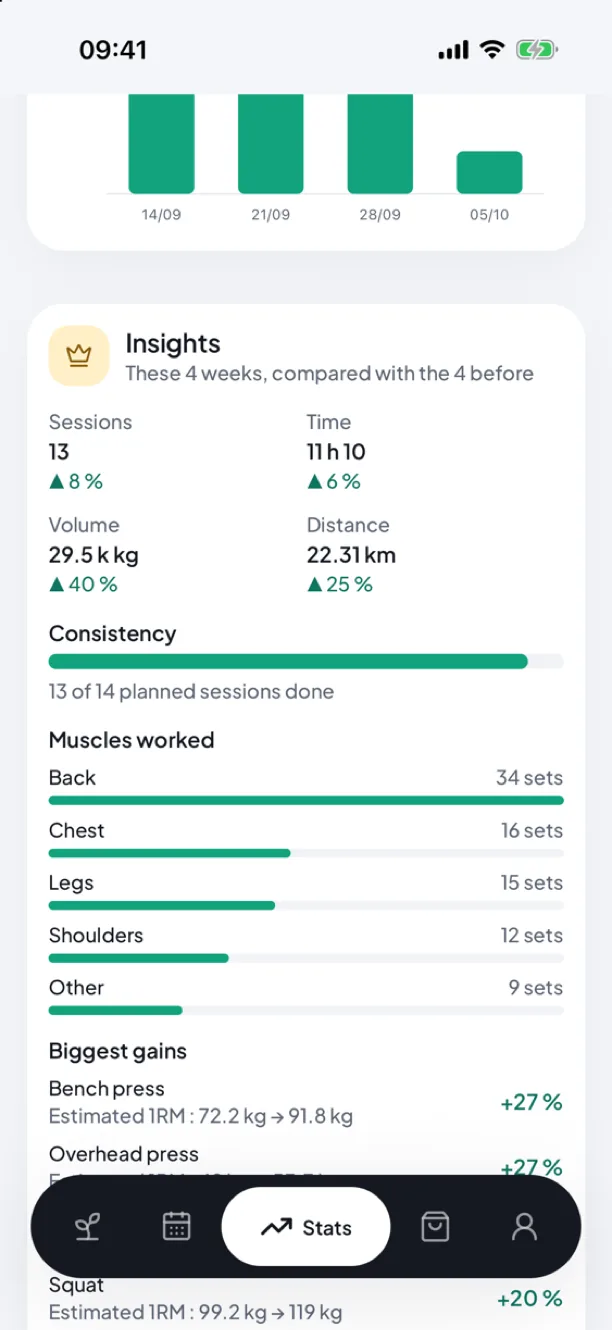
Your PRs are detected automatically. Stats show volume, minutes and the progress of each exercise.
- Free: the last 13 weeks.
- Premium: your full history, a one-year view, goals (100 kg bench press, 10 km…) and insights into your progress.
For advanced sessions
- Supersets: rest only starts at the end of the round.
- Set types: warm-up, drop set, to failure. Warm-ups don't count towards volume or PRs.
- Rate of perceived exertion (RPE), if you want to log it.
- A plate calculator to load the bar; warm-up calculation with Premium.
Coach Worki: which weight to aim for
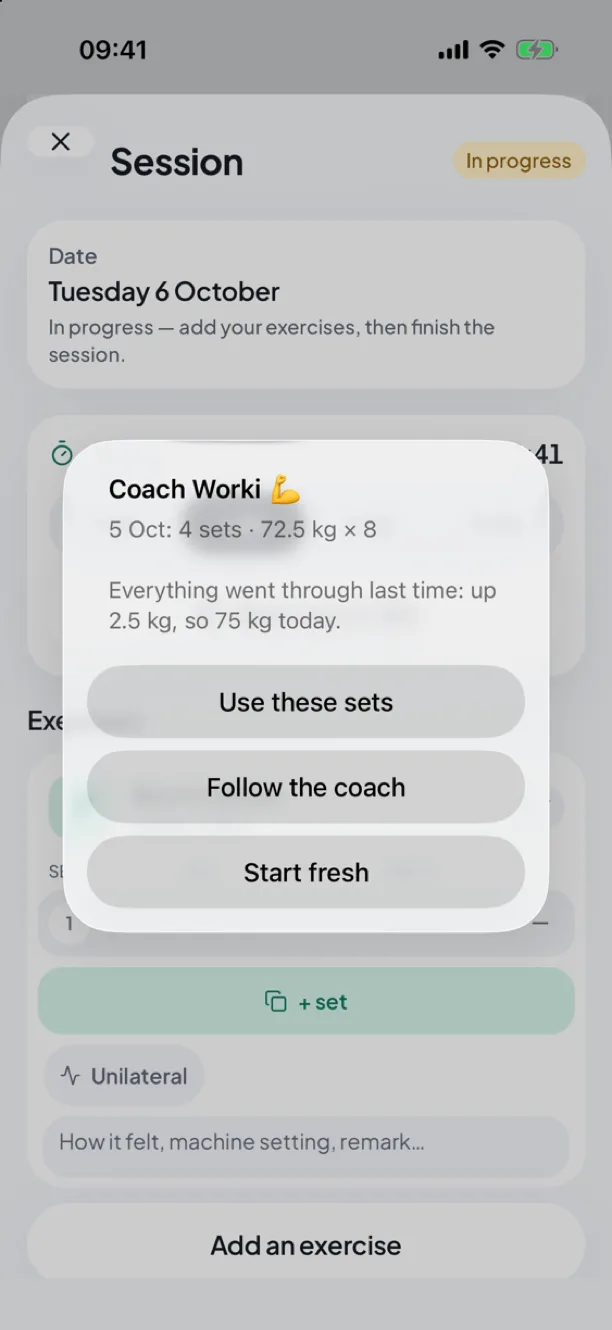
Based on your last two sessions, Coach Worki suggests today’s weight: +2.5 kg if everything went through, the same weight if a set stalled, about 10% less after two failures. You stay in control. Included in Premium, with a free preview once per workout.
Switch apps without losing your history
Workomp imports Strong and Hevy CSV exports: the file is read on your phone, and only the recognised workouts are sent. They count in your stats, PRs and coach. You can also export your workouts as CSV, or your whole account as JSON.
The limits
- iPhone only (iOS 16.4 and later); no Apple Watch app for now.
- Suggested weights (coach, starter program) are guides, not a tailored program.
Frequently asked questions
Is the gym log free?
Yes: workouts, exercises, PRs, supersets, set types, RPE and the plate calculator are free, with no ads. Premium (€4.99/month, €29.99/year or €79.99 for life) adds Coach Worki, goals, insights and your full history.
Can I use Workomp without a connection?
Yes. You can log and check in a session offline; it syncs when you are back online.
Can I bring my Strong or Hevy history?
Yes, from your profile: pick the app's CSV export in Files. Importing again doesn't create duplicates.
Read next
- A workout motivation app to help you stick to your sessionsHow a workout motivation app helps you stick to your sessions: a weekly plan, reminders, widgets, a streak and a mascot that grows with your consistency. Free on iPhone.
- A beginner workout plan: where to startHow many sessions a week, how many sets, what weight: the basics of starting strength training, and a ready-made plan to follow on iPhone, for free.
- Switch from Strong or Hevy to Workomp without losing your historySwitch from Strong or Hevy to Workomp without losing your history: CSV import, PRs and stats carried over, what changes and what does not. Free on iPhone.
- A workout widget on your iPhone so you never forget your sessionA workout widget for iPhone: next session, streak and mascot on your Home Screen and Lock Screen, a monthly calendar, your rest in the Dynamic Island. Free.
- Workomp homeTrack your workouts, exercises and PRs, without distractions.